(CH) 2 - New Features
Description
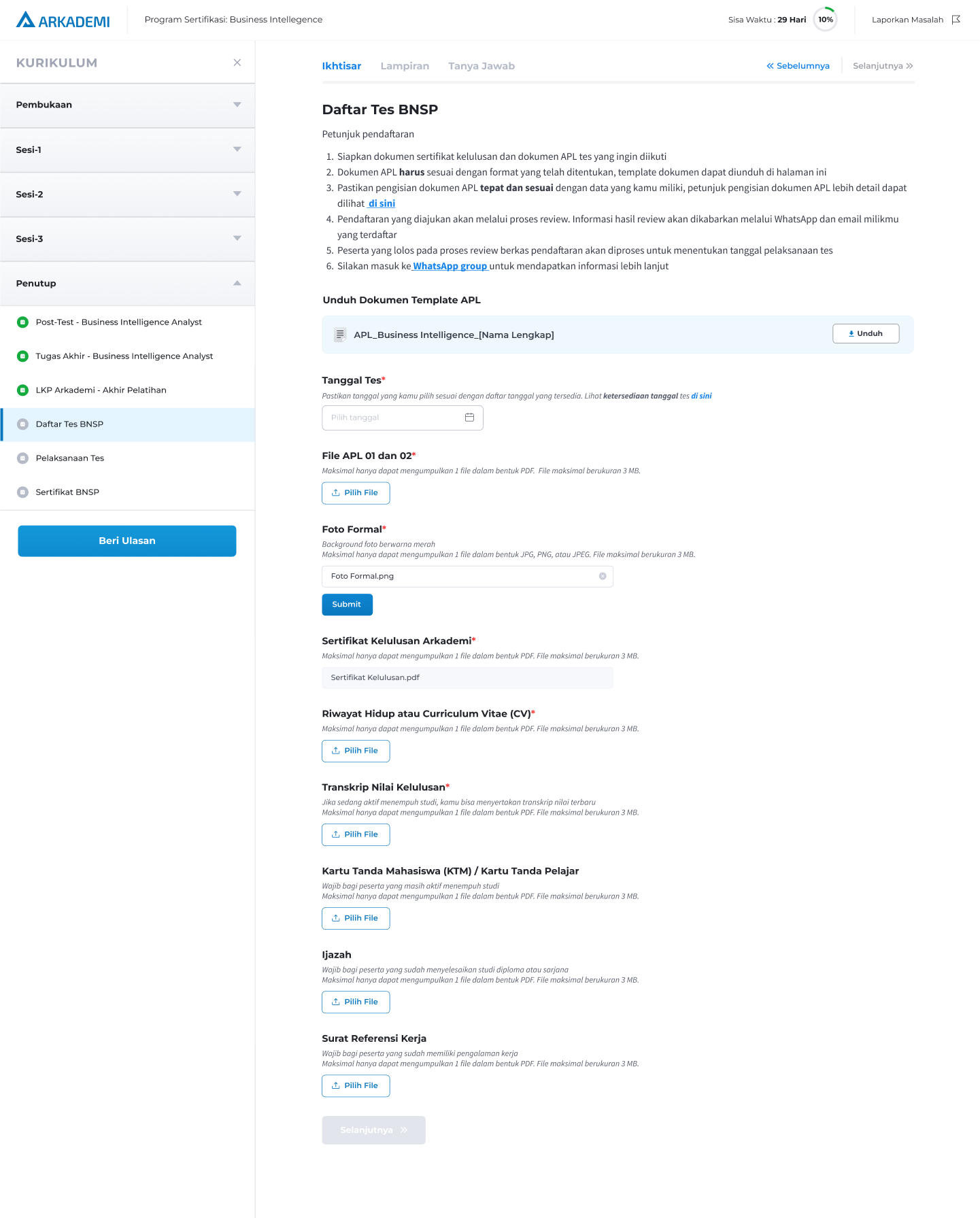
In the status course, several units are added including the KYC implementation, registration form and a unit to display the BNSP certificate if the user passes the test.
Development
User Interface
Click here to see more.
Requirements
- Add a new unit: Opener Unit
- Name: Kursus Program Sertifikasi
- Personal Data - Implement KYC
- Add a new unit: Closing Unit
- Registration (apply BNSP test)
- Registration information (instructional video hyperlink, WA hyperlink)
- Document download (form - word download)
- Test schedule hyperlink
- Test Date (use calendar)
- Upload certificate file (pdf, jpg, png, jpeg, 5mb - drag n drop on desktop, select the file in resp apps)
- Upload APL file (pdf only, 5MB - drag & drop on desktop, select file in resp apps)
- "Daftar" button when complete
- Pop up "Data sudah sesuai?"
- If the user does not pass: the unit page will display brief info and the "Lewati" button
- Doing the test
- Waiting for registration form verification process 3 days (admin panel)
- "Muat Ulang" button
- Detailed information about the test - the "Muat Ulang" button is missing
- Display feedback information (admin panel) if there is still an error - button "Muat Ulang"
- If the user does not pass: the unit page will display brief info and the "Lewati" button
- BNSP Certificate
- BNSP certificate information will appear after 2 x 24 hours after the test implementation
- Button "Muat Ulang"
- BNSP certificate appears after being uploaded on the admin panel
- The "Lihat Sertifikat" button leads to Profile -> Certificate -> Graduate Certificate of Competence
- If the user does not pass: the unit page will display info on not passing and no certificate will appear.
- Registration (apply BNSP test)
Repository Link
Due to a lot of work in this scope, you can see the changes by visiting the repository branch.
https://gitlab.com/arkademi/arkademi-frontend-course-status/-/commits/bnsp?ref_type=heads
Related Document
Writer: Media
Contributor: Arif
31 May 2024