Persiapan Kerja
Introduction
This document explain things about Persiapan Kerja feature, including the mockup, and technical requirements.
Overview
Perisapan Kerja is the first project of Lead Magnet (product team). Lead Magnet is a project initiation carried out in attracting consumers in terms of interest in the product as well as making it easy to reach out to consumers from the company side.
Perisapan Kerja is a project based on the need to increase the number of active users from new and retention users. It is a feature to meet user needs for job application documents and how to prepare for work. The goal of this project is to increase MAU (Monthly Active User), specifically for retain users (Arkademi users) on the Arkademi web landing page by 1% from July 2023 data of 37,000 to 37,350 within one month.
Related Documents
Repository
https://gitlab.com/arkademi/arkademi-frontend-next-v2/
Mockup
This feature focusing on the desktop and responsive view. To see the detail, click here.
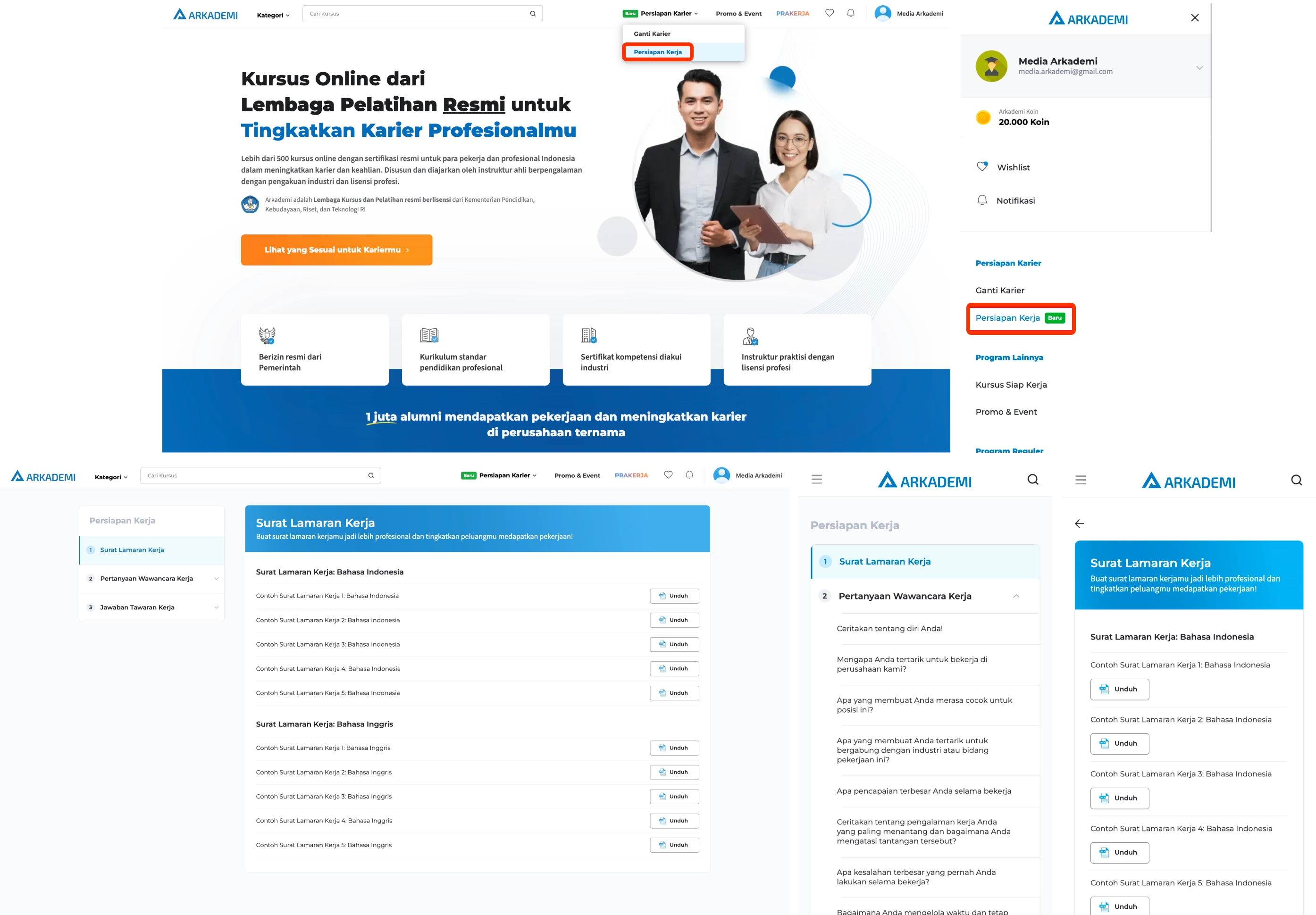
Specifications and Requirements
Main
This feature is available in both desktop and responsive views.
import dynamic from "next/dynamic";

const WorkPreparationPart = dynamic(() => import("./WorkPreparationPart"));
const WorkPreparationRespPart = dynamic(() =>
  import("./WorkPreparationRespPart")
);

export { WorkPreparationPart, WorkPreparationRespPart };
The desktop layout is set in the file /src/pages/persiapan-kerja/index.tsx and the responsive layout in the file (/src/pages/persiapan-kerja/[pk_slug].tsx). Therefore, the content component on the desktop layout needs to be disabled by adding the hiddenMobile prop.
return (
  <div className="wp-layout">
    <WorkPreparationSidebar menu={data.side_menu} setSlug={setSlug} />
    <WorkPreparationContent data={data} slug={slug} hiddenMobile />
    // hiddenMobile to not show components on responsive layouts
  </div>
);
For navigation on responsive layouts, it is necessary to add a back button.
const WorkPreparationRespPart = ({ data, slug }: IWorkPreparationRespPart) => {
  const router = useRouter();
  return (
    <div className="wp-layout">
      <Image
        onClick={() => router.back()}
        src={IcBack}
        alt="ic-back"
        className="wp-ic-back"
      />
      <WorkPreparationContent data={data} slug={slug} />
    </div>
  );
};
Sidebar and Contents
The data used in the sidebar and content is static data from the src/json/WorkPreparation.json file.
Sidebar
<div className="wp-sidebar-wrapper">
  <h2 className="sb-header">Persiapan Kerja</h2>
  <div className="sb-menu-wrapper">
    {menu &&
      menu.map((data, index) => (
        <SidebarPart
          key={index}
          number={index}
          data={data}
          childIndex={menuActive.childIndex}
          active={menuActive.parentIndex == index}
          onChange={(a, b, c, d) =>
            handleParent(a ? a : index, b, c ? c : data.slug, d)
          }
        />
      ))}
  </div>
</div>
Handling Menu
In order to keep presenting the menu position selected before login, it needs to be handled using the following function.
const handleParent = (
  parent_index: number,
  child_index: number,
  slug: string,
  query: string
) => {
  if (
    menuActive.parentIndex != parent_index &&
    menuActive.childIndex != child_index
  ) {
    const index = {
      parentIndex: parent_index,
      childIndex: child_index,
    };

    setMenuActive(index);
    setSlug(slug);
  } else if (
    menuActive.parentIndex == parent_index &&
    menuActive.childIndex != child_index
  ) {
    const index = {
      parentIndex: menuActive.parentIndex,
      childIndex: child_index,
    };
    dispatch({
      type: SET_GLOBAL_DATA,
      payload: {
        persiapanKerja: {
          ...index,
          slug,
          query: query ? `?${query}=${child_index + 1}` : "",
        },
      },
    });
    setMenuActive(index);
    setSlug(slug);
  } else {
    const index = {
      parentIndex: parent_index,
      childIndex: child_index,
    };
    dispatch({
      type: SET_GLOBAL_DATA,
      payload: {
        persiapanKerja: {
          ...index,
          slug,
          query: query ? `?${query}=${child_index + 1}` : "",
        },
      },
    });
    setMenuActive(index);
    setSlug(slug);
  }
};
Content
Content is a component to present data from the selected sub menu. There are 3 types of content, which are:
- Surat Lamaran Kerja
- Pertanyaan Wawancara Kerja
- Jawaban Tawaran Kerja
<div className={`wp-content ${hiddenMobile && "hidden"}`}>
  <dt className="wp-content-header">
    {isReverse ? (
      <>
        <h2 className="wp-content-header-title"></h2>
        <h4 className="wp-content-header-sub-title"></h4>
      </>
    ) : (
      <>
        <h4 className="wp-content-header-sub-title"></h4>
        <h2 className="wp-content-header-title reversed"></h2>
      </>
    )}

</div>
Letter Content
Letter Content is the content of the Surat Lamaran Kerja, has supporting files that can be downloaded. The download can be performed if the user has logged in.
<Popup />
  <div className="letter-content-wrapper">
    ...
      {isLoggedIn ? (
        <a id="pk_download" target="_blank" href={examples.url} className="content-list-button" >
          <Image id="pk_download" src={IcDoc} alt="ic-download" />{" "}
          Unduh
        </a>
      ) : (
        <div id="pk_download" onClick={() => LoginPopup()} className="content-list-button" >
          <Image id="pk_download" src={IcDoc} alt="ic-download" />{" "}
          Unduh
        </div>
      )}
      ...
  </div>
Base Content
Base Content is content for Pertanyaan Wawancara Kerja dan Jawaban Tawaran Kerja. This component has content viewing restrictions that can be opened if you have logged in.
<Popup />
  <div className="base-content">
    {isLoggedIn &&
      data?.answers.map((answers, index) => (
        <div key={index} className={`base-content-list-wrapper ${ data?.excerpt?.length != index + 1 && "border-bottom" }`} >
          <h4 className="list-label">Contoh Jawaban {index + 1}</h4>
          <pre className="list-content">{answers}</pre>
        </div>
      ))}
    {!isLoggedIn &&
      data?.excerpt.map((excerpt, index) => (
        <div key={index} className={`base-content-list-wrapper ${ data?.excerpt?.length != index + 1 && "border-bottom" }`} >
          <h4 className="list-label">Contoh Jawaban {index + 1}</h4>
          <pre className="list-content">
            {excerpt}
            <button id={data.track_id} className="list-content-more" onClick={() => LoginPopup()} >
              Lihat Selengkapnya
            </button>
          </pre>
        </div>
      ))}
  </div>
Component Popup login
A popup in the form of a login prompt, triggered by content that needs to be opened if the user has not logged in.
const PopupLogin = ({ close }: IPopupLogin) => {
  return (
    <div className="pk-login-popup">
      ...
      <Link href={"/masuk?from=pk-page"} id="pk_click_masuk">
        <button className="pk-login-button" id="pk_click_masuk">
          Masuk
        </button>
      </Link>
    </div>
  );
};