Informasi Gaji
Introduction
Overview
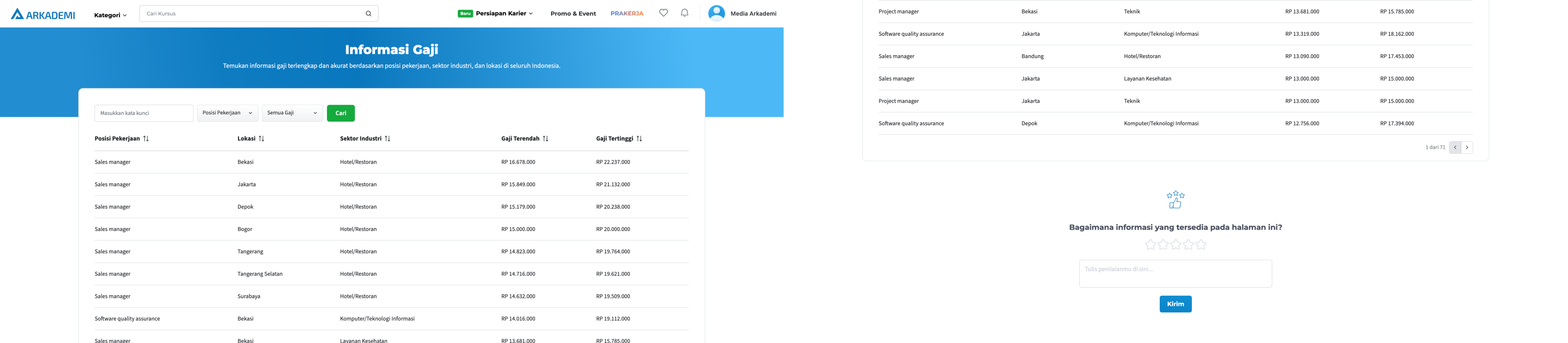
Informasi Gaji is the second project of the Lead Magnet product team. The Lead Magnet project was initiated to attract consumer interest in the product and facilitate communication with consumers from the company's side.
Informasi Gaji is a feature that offers users information about the salary range summaries for the job fields they are interested in, based on the city or sector they are targeting when applying for jobs. With the goal of increasing Monthly Active Users (MAU), particularly in terms of login and registration on Arkademi.
Related Documents
Repository
https://gitlab.com/arkademi/arkademi-frontend-next-v2/-/blob/master/src/pages/informasi-gaji/index.tsx
Mockup
Requirements and Specifications
Main
Index page of Informasi Gaji, contains components of Informasi Gaji and feedback form of Informasi Gaji.
import ArkLayout from "elements/Layout";
import PageMeta from "elements/pageMeta";
import InformasiGajiPart from "parts/SalaryInfoPage";
// Merupakan komponen utama, berisi komponen filter (search, dropdown), table, dan pagination button
import FeedbackInformasiGaji from "parts/SalaryInfoPage/FeedbackInformasiGaji/FeedbackInformasiGaji";

const InformasiGaji = () => {
  return (
    <ArkLayout>
      <PageMeta title="ARKADEMI | Informasi Gaji" />
      <InformasiGajiPart />
      <FeedbackInformasiGaji />
    </ArkLayout>
  );
};

export default InformasiGaji;
Feature Parts
Search and Filter
Layout Condition:
- Line 9: Width > 1000 = Flex row, to right
- Line 65: Width < 1000 = Flex col, to down
- Line 78: Width < 1000 = Flex row, to right for dropdown 1 & 2
import SalaryInfoSearchFilter from "./filters/search";
import SalaryInfoDropdownFilter from "./filters/dropdown";

...

return (
  <div className="si-container">
    ...
    <div className="si-table-container">
      { width > 1000 ? (
        <div className="si-table-filters">
          <SalaryInfoSearchFilter
            state={filterState?.search_value}
            output={(search) => {
              setSearchValue(search ? `value=${search}` : ""),
                dispatch({
                  type: SET_GLOBAL_DATA,
                  payload: {
                    informasi_gaji: { ...filterState, search_value: search },
                  },
                });
            }}
          />
          <SalaryInfoDropdownFilter
            track={"ig_dd_posisi"}
            option={optionPosisi}
            output={(filter, name) => {
              setFilterField(filter ? `field=${filter}` : ""),
                dispatch({
                  type: SET_GLOBAL_DATA,
                  payload: {
                    informasi_gaji: {
                      ...filterState,
                      filter_posisi: name,
                      filter_posisi_id: filter,
                    },
                  },
                });
            }}
            state={filterState?.filter_posisi}
          />
          <SalaryInfoDropdownFilter
            track={"ig_dd_range_gaji"}
            option={optionGaji}
            output={(filter, name) => {
              setFilterSalary(filter ? `salary=${filter}` : ""),
                dispatch({
                  type: SET_GLOBAL_DATA,
                  payload: {
                    informasi_gaji: {
                      ...filterState,
                      filter_gaji: name,
                      filter_gaji_id: filter,
                    },
                  },
                });
            }}
            state={filterState?.filter_gaji}
          />
          <button id="ig_click_cari" className="si-table-filter-button" onClick={handleSearch} >
            Cari
          </button>
        </div>
      ):(
        <div className="si-table-filters">
          <SalaryInfoSearchFilter
            state={filterState?.search_value}
            output={(search) => {
              setSearchValue(search ? `value=${search}` : ""),
                dispatch({
                  type: SET_GLOBAL_DATA,
                  payload: {
                    informasi_gaji: { ...filterState, search_value: search },
                  },
                });
            }}
          />
          <div className="si-table-dropdown">
            <SalaryInfoDropdownFilter
              track={"ig_dd_posisi"}
              option={optionPosisi}
              output={(filter, name) => {
                setFilterField(filter ? `field=${filter}` : ""),
                  dispatch({
                    type: SET_GLOBAL_DATA,
                    payload: {
                      informasi_gaji: {
                        ...filterState,
                        filter_posisi: name,
                        filter_posisi_id: filter,
                      },
                    },
                  });
              }}
              state={filterState?.filter_posisi}
            />
            <SalaryInfoDropdownFilter
              track={"ig_dd_range_gaji"}
              option={optionGaji}
              output={(filter, name) => {
                setFilterSalary(filter ? `salary=${filter}` : ""),
                  dispatch({
                    type: SET_GLOBAL_DATA,
                    payload: {
                      informasi_gaji: {
                        ...filterState,
                        filter_gaji: name,
                        filter_gaji_id: filter,
                      },
                    },
                  });
              }}
              state={filterState?.filter_gaji}
            />
          </div>
          <button id="ig_click_cari" className="si-table-filter-button" onClick={handleSearch} >
            Cari
          </button>
        </div>
        )}
    </div>
  </div>
)
Table Component
import { DataTable } from "primereact/datatable";

const DataTableSalaryInfo: FC<IDataTableSalaryInfo> = ({
  dataTable,
  filters,
  globalFilterFields,
  columns,
  emptyMessage,
}) => {

  ...

  return (
    <>
      <DataTable
        value={filtered}
        emptyMessage={emptyMessage || "Data Kosong"}
        tableClassName="datatable-salary-info"
        filters={filters}
        globalFilterFields={globalFilterFields}
        removableSort
      >
        {dynamicColumns}
      </DataTable>
    </>
  );
};
Popup Login
In the condition of unauth, a pop up will appear if you press the search button and the navigation button (next & prev) for the table.
const PopupLogin = ({ close }: IPopupLogin) => {
  return (
    <div className="pk-login-popup">
      <BiX id="ig_click_x" onClick={() => close()} className="pk-login-close" />
      <div className="pk-login-wrapper">...</div>
      <Link href={"/masuk?tracking=ig-page"} id="ig_click_masuk">
        <button
          onClick={() => close()}
          className="pk-login-button"
          id="ig_click_masuk"
        >
          Masuk
        </button>
      </Link>
    </div>
  );
};
Popup Feedback
The feedback rating popup component will appear when the user is on the page for 3 minutes.
const PopupRate = ({ close }: IPopupRate) => {
  const toIsiFeedback = (e: any) => {
    e.preventDefault();
    const element = document.getElementById("feedback-informasi-gaji");
    element?.scrollIntoView({ behavior: "smooth" });
    close();
  };
  return (
    <div className={styles.container} id="ig_feedback">
      <button className={styles.btn_cta_close} id="ig_feedback_x">
        <MdClose
          id="ig_feedback_x"
          className={styles.icon_close}
          onClick={() => close()}
        />
      </button>
      <Image id="ig_feedback" src={IconThumb} alt="" className={styles.icon} />
      <div className={styles.detail} id="ig_feedback">
        <h3 className={styles.title} id="ig_feedback">
          Beri Penilaian
        </h3>
        <p className={styles.desc} id="ig_feedback">
          Yuk, berikan rating dan penilaianmu tentang informasi gaji di halaman
          ini.
        </p>
      </div>
      <button
        id="ig_feedback"
        className={styles.button_rate}
        onClick={(e) => toIsiFeedback(e)}
      >
        Isi Sekarang!
      </button>
    </div>
  );
};
Feedback
This is the feedback box under the Informasi Gaji table, the data is stored in document sheets.
return (
  <>
    ...
    <div className={styles.wrapper} id="feedback-informasi-gaji">
      ...
      <div className={styles.form_informasi_gaji}>
        <form className={styles.form} onSubmit={handleSave}>
          ...
        </form>
      </div>
    </div>
  </>
);